

Navigating Digital Sales Room Software: A Journey Through Top Choices
Explore a thorough analysis of Journey alongside other leading Digital Sales Room (DSR) software options. Discover features, pricing, and insights to make an informed choice for your sales team.In my Journey Alternatives blog post series, I’ve compared Journey to several other Digital Sales Room Software.
I use the word “compared” in the best possible way. After all, I wouldn't compare Journey to those alternatives if I didn't find them awesome.
For this very reason, I thought it would be pertinent to add them all into a single article about the best Digital Sales Room (DSR) software out there and see how they stack up against each other.
Let's examine what each tool offers: Deal Rooms, Pods, Destinations, and Journeys.
But first, let’s examine the true definition and baseline requirements of DSRs—so that you don’t fall for tools that overpromise and underdeliver.
What Are Digital Sales Rooms and How Do They Work?
Dealing with many decision-makers in B2B sales can be a royal pain. It’s hard to know who to focus on and what’s happening on the buyer's side, which often causes sales teams to miss their targets. DSRs seek to simplify this process, aiming to make B2B sales as straightforward as online shopping.
With DSRs, sales reps can see exactly which content each stakeholder interacts with, how often they view it, and who they share it with. This allows for timely and accurate follow-ups. Sellers can (hopefully) quickly rebrand their content to meet the needs of all decision-makers in a buying committee – no matter how large.
The right DSRs should support the entire sales process, from initial outreach to post-demo to onboarding and customer retention. This makes them useful for several different roles beyond sales reps, including:
- Heads of Sales
- Account Executives
- Heads of Marketing
- SDRs/BDRs
- Content Marketing Managers
- Sales Enablement Managers
- Customer Success Teams
- Fundraisers
At minimum, any DSR worth its salt should…
- Give you an easily accessible link to easily share content with stakeholders
- Include at least one real-time communication feature (like live chatting, commenting, and video calls)
- Offer comprehensive, detailed analytics (including both personal-level and room-level insights)
- Be widely customizable and offer branding capabilities
- Offer seamless integration with commonly used tools like CRMs (e.g., Salesforce, HubSpot), Google Drive, Slack, etc.
- Provide strong security features to protect sensitive sales data and ensure privacy
- And, of course, offer scalable plans that grow with your business
Now, let’s jump into our options.
The Best Digital Sales Room Software and How They Compare
The following comparisons will be divided as follows:
- An overview – based on how each DSR is defined throughout its marketing
- Some of the prominent available features (that don’t include the obvious)
- Pros & cons based on what users have reported (in reviews like G2, Capterra, etc.)
- Pricing!
- Integrations (with a note that all DSRs allow embedding of a range of other tools besides workflow integration)
- And to wrap up, my personal experience and view of the tool (followed by an in-depth review for those of you who want to know more)
That said, if you’re strapped for time or simply don’t want to read all of it, here’s a breakdown of all the tools I’ll be mentioning today:
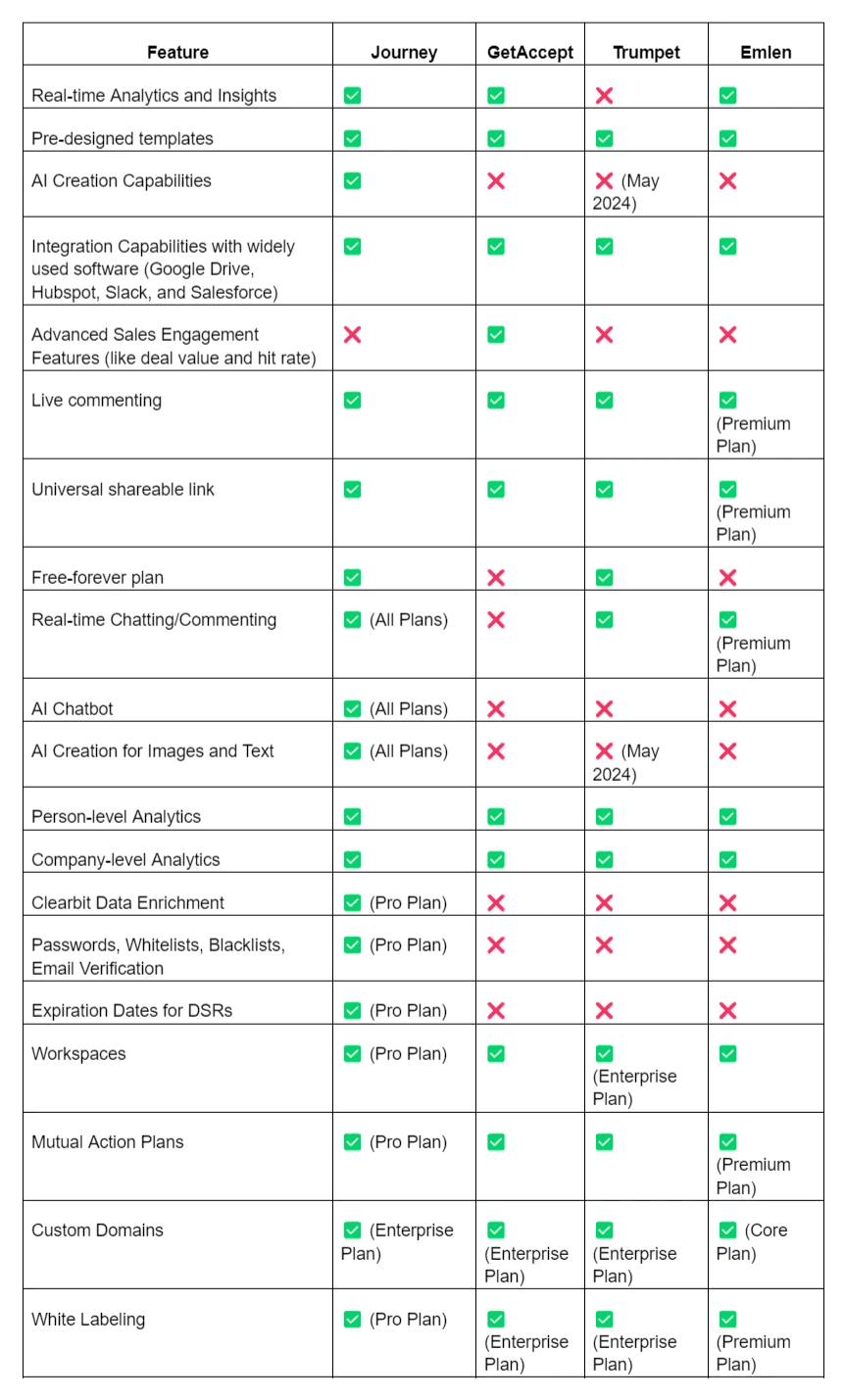
Journey
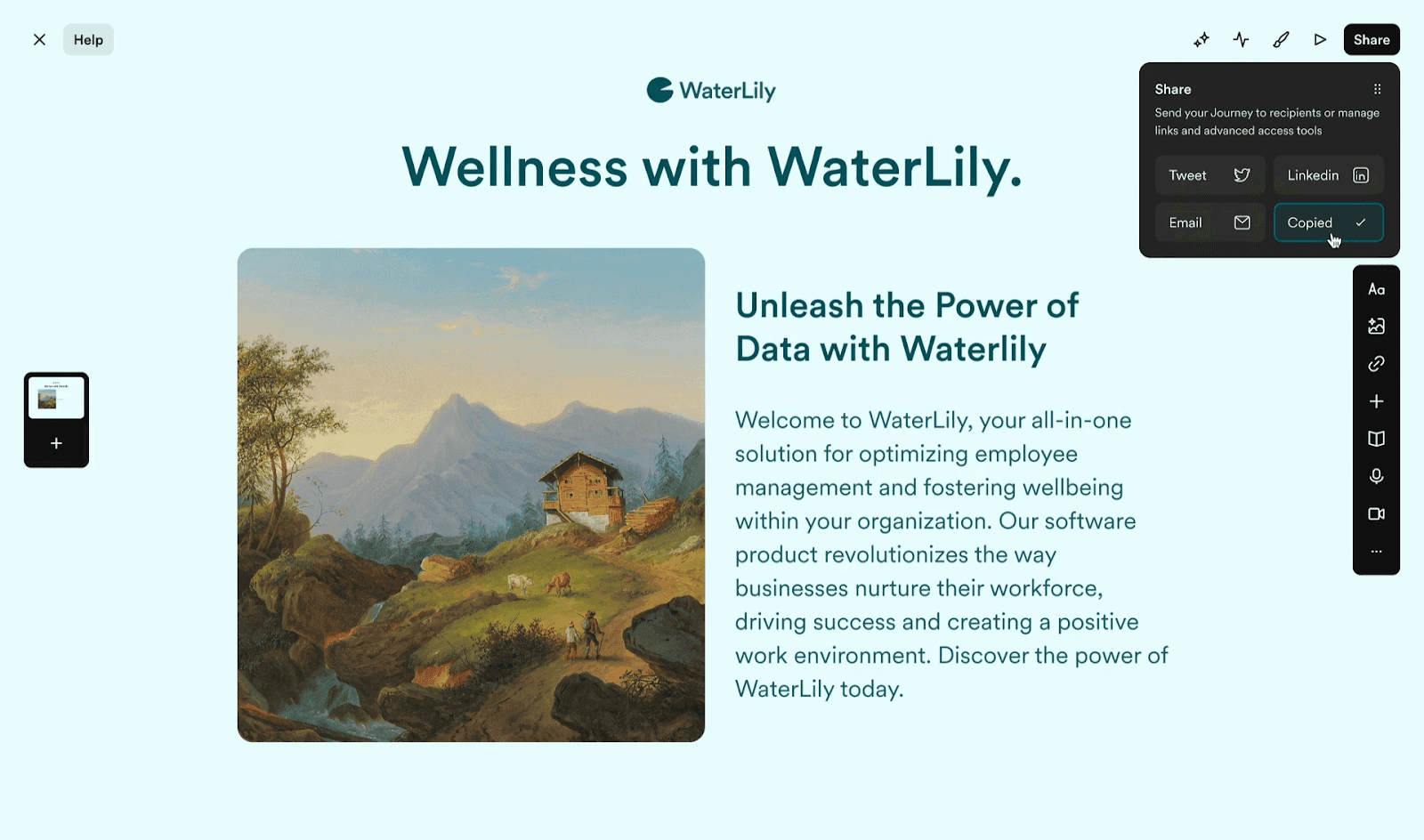
Overview
Journey.io leads the pack with its AI capabilities, which are currently unmatched by the other alternatives.
But what excites me about this tool is how it steers towards two things seldom mentioned throughout B2B sales cycles: storytelling and beauty. No wonder you’ll see an artistic motif across Journey’s marketing.
What sets Journey apart is its sleek design and user-friendly interface. When you're presenting to prospects, you want to leave a lasting impression, and Journey helps you do just that. Plus, its handy templates make creating demos and pitches so much easier. Of course, you can track everything, from views to how much time prospects spend on each page.
"Journey is beautiful, simple to set up, and creates an unparalleled experience. Whether it's investor presentations, sales, partnerships, or more, it creates that extra wow experience that gets deals closed." Jeromy Sonne, Verified Journey user
Features
- AI capabilities (Image and text creation + Chatbot integration)
- Access Controls (such as Allow and Deny lists, passcodes and verification, and expiration dates)
- Clearbit-enriched insights
- Aggregated data tracking
- Mutual action plans
Pros & Cons
Pros:
✅ Answer prospect questions in real-time with AI chatbot integration
✅ Uncomplicated pricing
✅ Easily create content manually or with help from AI
✅ Quick and efficient journey creation, with the ability to reuse old blocks
✅ Responsive and supportive customer service
✅ Flexible, uncluttered drag-and-drop builder
Cons:
❌ Limited ability to customize fonts as desired
❌ Limited ability to customize the table of contents, which may lead to unnecessary links
❌ The starting price for the paid plan might be steep for very early-stage startups
❌ Initial setup of the first journey may take time as users figure out their preferred workflow
Pricing
- Basic: Free per user/month
(Get up to 5 free Journeys per organization to try out)
- Pro: $29 per user/month
- Teams: Contact Journey
Integrations
- Slack
- Salesforce
- Segment
- Google Drive
- HubSpot
- Zapier (for sending Journey activity data)
- Gong (Enterprise plan only)
Personal experience
One of Journey’s best features is the AI-driven content creation and customization, which saves your team a lot of time and makes things look professional without much effort. The infinite scrolling and customization abilities are great for keeping prospects engaged. If your team cares about how great your DSRs can look, go for this option.
The only caveat is that it would be great to have more font size options and a wider selection of fonts to nail the branding.
Moreover, the real time commenting and AI chatbot are handy for getting quick answers and finding information without digging through lots of content.
On the downside, Journey’s pricing can be a bit of a dealbreaker, especially for smaller teams, since some of the cooler features (like Clearbit-enriched insights) are locked behind the Pro plan. However, the free plan is a nice way to get started, and the pricing is very reasonable compared to what other DSR tools are charging.
GetAccept
Overview
At its core, GetAccept's Digital Sales Room is a centralized hub where sellers and buyers collaborate and negotiate. Initially, it sounds like your typical DSR definition.
However, unlike other tools we’ll mention (which comprise a single DSR), this room consists of two key rooms: the Deal Room and the Contract Room.
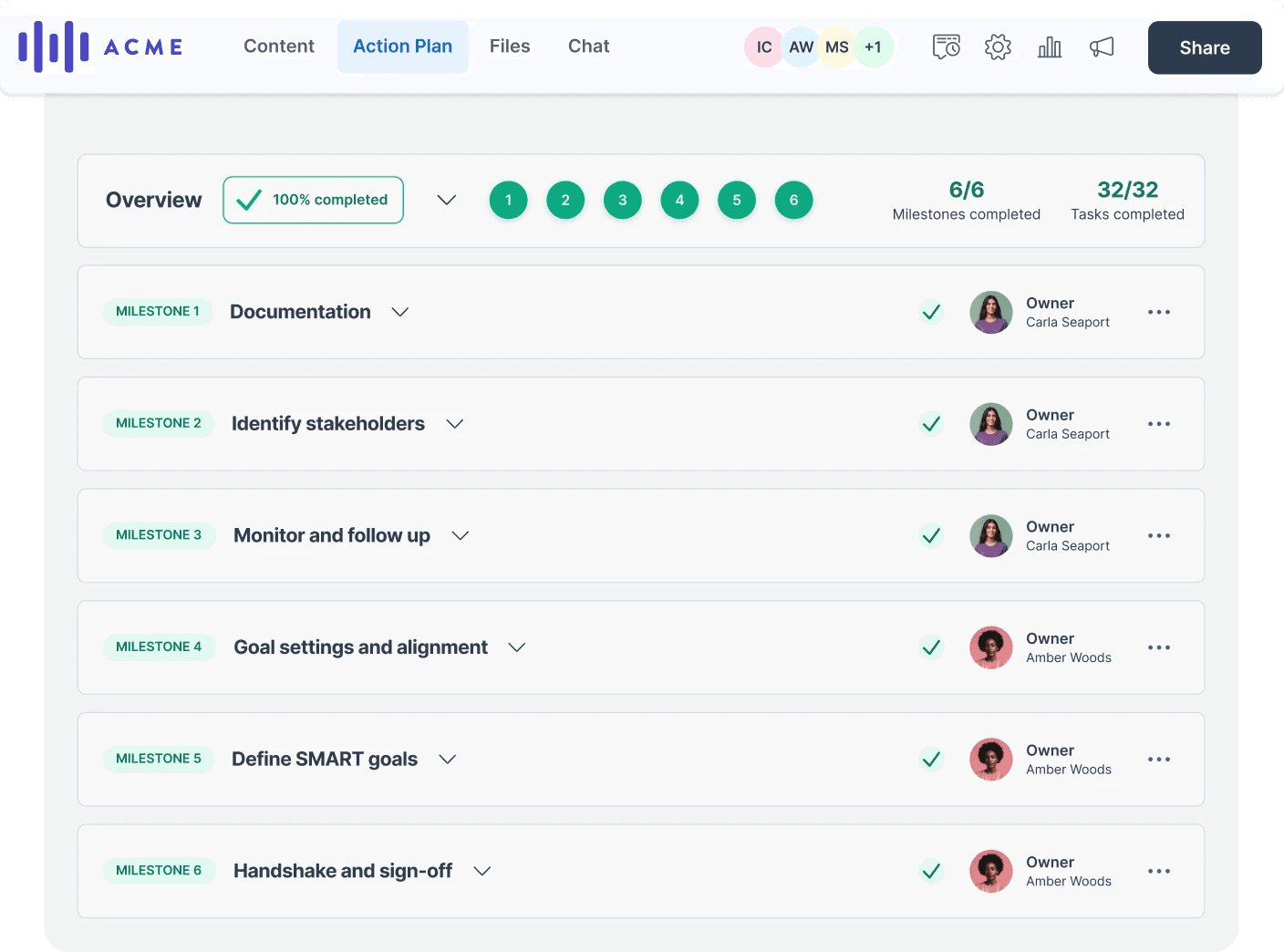
In the Deal Room, sellers can increase their win rates by making collaboration between buyers and sellers easier within a shared space. It’s where they can upload sales collateral, create mutual action plans, and chat with buyers in real time.
Moving into the Contract Room, sales reps can craft compelling proposals, contracts, and other sales materials. They can start from scratch using the in-app editor or use pre-made templates to generate interactive, branded materials.
If you want the full experience in a single space, you can purchase the Deal Room and the Sales Room simultaneously for a one-stop sales powerhouse. They call it the “Full Suite.”
"This is a way for you to control the narrative. To make sure your reps are sticking to the process, adopting the principles you’ve set, and helping your customers to experience value instead of just product pitching." Remi Morken, Senior Vice President of Sales, Salesscreen